
Agricultural Datasets / Original EGO R8 guide; research context from the DINO+CDP Tomato Harvesting Dataset / Sep 22, 2026
Tomato Harvesting Dataset: Stereo Capture with EGO R8
Plan a tomato harvesting dataset with EGO R8 stereo video, synchronized cameras and IMU data. Follow a greenhouse workflow from vine to crate.
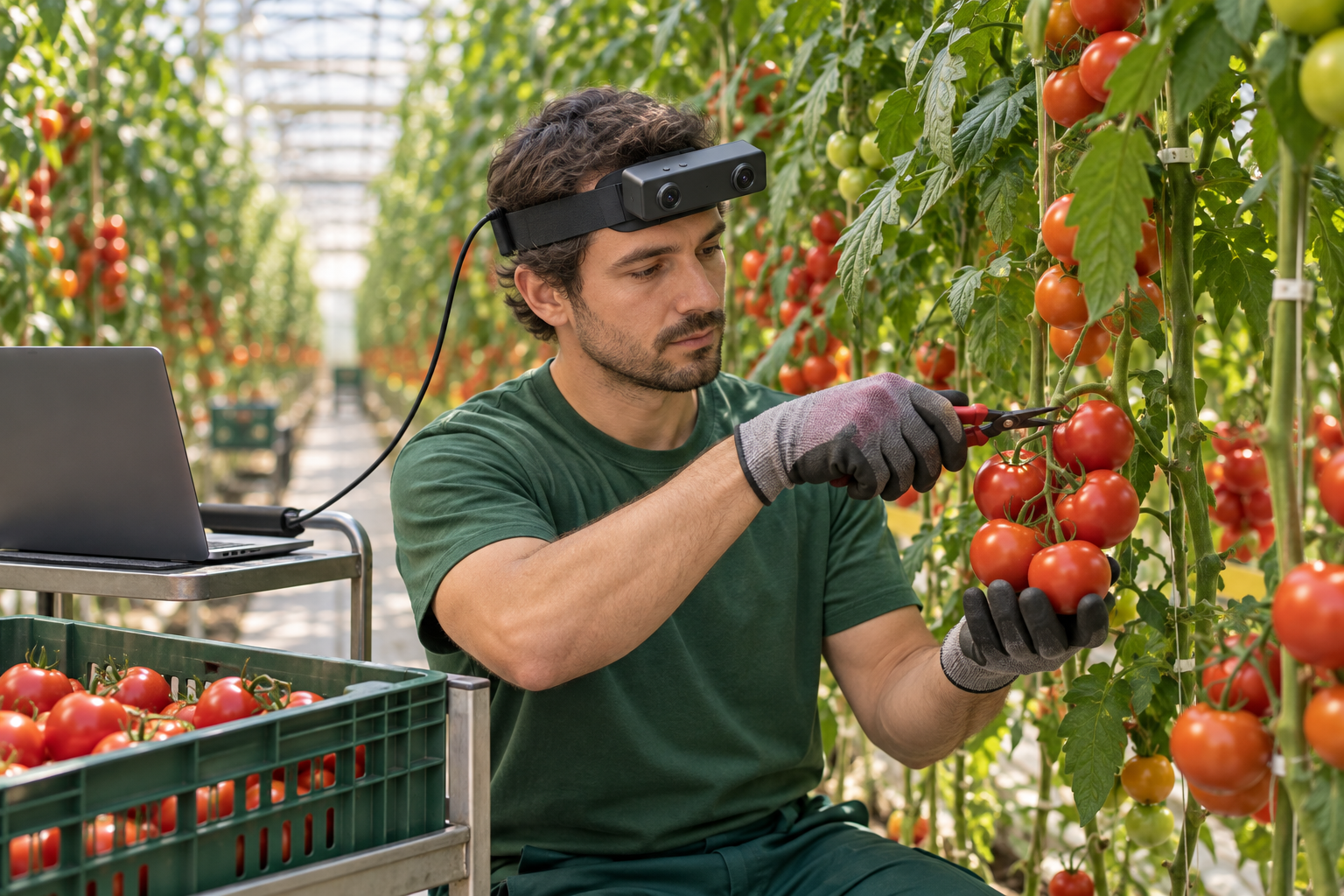
How can EGO R8 capture a tomato harvesting dataset?
- Record a complete greenhouse episode: approach the tomato cluster, reach, support, detach, transfer, and release into the crate.
- Use EGO R8’s dual global-shutter cameras and common hardware trigger to retain synchronized left and right views.
- Select 100, 200, or 500 Hz for the R8 6-axis IMU and preserve the unified hardware timestamps with the images.
- Have reviewers label the harvesting phases; archive those annotations with the original recordings and per-unit calibration files.
A tomato harvesting dataset can preserve the complete first-person sequence from selecting a cluster to placing fruit in a crate. In a greenhouse aisle, a harvester reaches toward a tomato cluster, supports the fruit, completes the picking action, and transfers the harvest to a crate. Leaves, hands, stems, and nearby fruit enter and leave the view throughout that sequence. A useful tomato harvesting dataset preserves these transitions as complete episodes. Worn on the head, EGO R8 records the task from the harvester’s viewpoint, keeping the visible hand–plant interaction connected to the movement toward the collection crate.
The DINO+CDP Tomato Harvesting Dataset, published by Dugan Um on Mendeley Data, provides research context for organizing tomato-task demonstrations as time-aligned sequences. This article develops an original R8 workflow for human harvesting demonstrations. The reference informs the emphasis on complete episodes and organized timing; all R8 functions and numerical parameters below come from the supplied manufacturer specification and the current R8 product page.
Plan complete tomato harvesting episodes
Define one capture episode around one harvesting action: approach the selected cluster, reach and support, detach, transfer, and release into the crate. The grower determines the harvesting technique used for the crop. Before a full take, inspect a short R8 trial to see whether the fruit, working hand, relevant stem area, and crate appear at the intended stages. Record the aisle, row, session date, and episode identifier manually so the footage can be associated with its collection context.
Capture hand and fruit movement with R8 stereo cameras
R8 uses dual global-shutter cameras, with all image pixels in each sensor exposed simultaneously. During tomato harvesting, the visible scene changes when a hand reaches between leaves or the wearer turns from the vine toward the crate. Retain the two image streams through the complete action. Review the trial footage under the greenhouse’s actual lighting and choose a recording position that keeps the selected fruit and the active hand visible during the demonstration.
The two R8 cameras share a common hardware trigger or shutter signal. This synchronizes the left and right images when the hand approaches the cluster, supports the fruit, or begins the transfer. Keep the original pair relationship and frame order when selecting an episode for the dataset. At review time, inspect corresponding images around these action boundaries and preserve their timestamps with the source files.
Keep IMU samples and images on one timeline
The built-in 6-axis IMU offers selectable sampling at 100, 200, or 500 Hz. These samples record the camera wearer’s motion during a lean toward a cluster, a head turn along the vine, or a return toward the crate. Choose the IMU setting before the session and retain it in the episode metadata. R8’s unified hardware timestamps associate image frames and inertial samples on a common timeline, giving the processing team the timing information behind the changing first-person view.
Set up USB capture and per-unit calibration
R8 connects to the capture host over USB 2.0. The manufacturer specifies a 5 V supply and a maximum current of 320 mA. For a short harvesting demonstration, position the host on a nearby trolley and arrange the cable for the intended reach and turn movements. Verify recording continuity in a trial take before moving to the full episode. SDK/API provision supports integration with the team’s recording software; save the selected video profile and IMU rate with the session.
Per-unit calibration support includes camera intrinsics, distortion coefficients, and extrinsics where applicable. Associate the supplied files with the R8 unit and each greenhouse session. If the team later processes the paired views, it can retrieve the camera information that belongs to those recordings. Keep the calibration files alongside the original images, motion samples, and timestamps rather than separating them from the episode archive.
Collect greenhouse variation and label each action
Plan the collection across several selected clusters and repeat visits, recording the actual conditions in human-written notes. Include episodes with different leaf arrangements, fruit positions, and lighting in the aisle. A reviewer can mark when leaves or hands cover the target in the recorded images and select additional takes where needed. This makes the selection process explicit while keeping the recorded R8 data and the reviewer’s annotations separately identifiable.
After capture, the annotation team can manually label the phases approach, reach, support, detach, transfer, and release. Keep the labels tied to timestamps and check the boundaries against both image streams. Organize the archive by session and episode, with source images, IMU data, calibration, configuration, and annotation files. For a learning experiment, the research team can assign whole sessions to training, validation, or evaluation groups and document those assignments in its dataset manifest.
Prepare the R8 harvesting dataset for review
The completed R8 collection follows the tomato from the vine to the crate while retaining paired views and the wearer’s associated motion data. Its value lies in the recorded sequence: where the hands enter, how the fruit remains visible, and when the viewpoint moves toward the crate. Hardware synchronization, selectable IMU sampling, unified timestamps, and calibration support provide the documented capture foundation for the team’s agricultural dataset.
Sources and EGO R8 specifications
DINO+CDP Tomato Harvesting Dataset, version 2 — Dugan Um, Mendeley Data